
How I'm Eliminating Low-Value Tasks Using Claude Cowork

Everyone talks about focus, prioritisation, deep work; but nobody talks about the tax.
The real productivity killer is not big distractions. It's the accumulation of small, recurring tasks that never quite go away. Downloads folders that bloat. Emails that need sorting. Subscriptions you forgot about. Images that need fixing.
None of it matters. I find it all draining.
I've spent the last week using Claude Cowork to automate the tasks I kept putting off. Not because they were hard, because they weren't worth my attention.
Here's how I tackled the tax.
The Digital Mess Tax
Most productivity advice assumes your problem is strategy. It's not.
Your problem is the hundred tiny decisions you make every week that compound into exhaustion. Each one costs mental energy. pulling you away from work that actually moves things forward.
Download folders that contain everything filetype under the sun. Inboxes full of admin that needs action but not urgency. Subscription charges you barely notice. Image files with nonsense names and incorrect details.
Individually, tackling these tasks take minutes. Collectively, they create friction that slows everything down.
The question is not "should I do this?". The question is "should this require my attention at all"?
Elimination is the worlds best productivity tool.
What I Automated (And Why It Works)
Downloads Folder Organisation
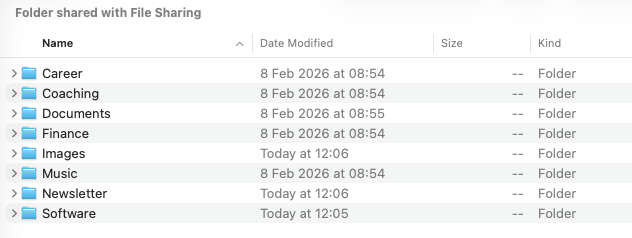
My downloads folder was chaos. Reciepts mixed with screenshots. Downloaded apps buried under random PDFs. Every time I needed something, I wasted time hunting.
I asked Cowork to sort it. It created folders by type, moved files into logical categories, and flagged anything that looked important. Took three minutes to review and approve. Now it runs weekly.
The win is not the clean folder. The win is never thinking about it again.
Gmail Triage and Admin Prioritisation
Like all of us, I get emails that need action but not immediately. Travel confirmations. Payment reminders. Meeting follow-ups. They sit in my inbox creating background noise.
Cowork now reads my Gmail, identifies admin tasks, and builds a prioritised list based on deadlines and importance. I review it once a week. Everything else stays out of sight.
This is not about inbox zero. This is about separating signal from static.
Subscription and Domain Audits
I was paying for tools I'd forgotten about. Domains I registered two years ago and never used. Small amounts, but they add up.
Cowork scanned my email history, flagged recurring charges, and listed everything with renewal dates. I cancelled eight subscriptions in one sitting. Saved over £400 a year.
The money matters less than the clarity. I now know exactly what I'm paying for and why.
Batch Image Processing
Photography often means handling batches of images. Wrong orientations. Terrible filenames. Inconsistent formats. Fixing them manually is tedious and error-prone.
Cowork processes entire folders at once. Fixes orientation, renames files with clear conventions, flags anything that looks corrupted. I check the output, approve it, done.
Batch processing saves hours. But the real value is removing decision fatigue from repetitive work.
The Control Question
The obvious concern: what if something goes wrong?
It's a fair question. I had the same one.
Here's what actually happens. Cowork shows you the plan before it acts. You approve each step. You see what changes before they're made. Nothing disappears. Nothing gets deleted without confirmation.
Some simple guardrail prompts help:
- Do not delete any files unless explicitly authorised
- If you are unsure what to do, ask me
- Place any items you are unsure of in an 'holding' folder
This is not autopilot. This is delegation with oversight. I think of Cowork as an intern who is on a learning curve.
I've run these tasks multiple times. Nothing has gone missing. Nothing has broken. The safety rails work.
The real risk is not using tools like this. The real risk is staying stuck in manual mode while your time drains away on work that doesn't need you.
What Changed
I'm not more productive because I have more time. I'm more productive because I'm not making tiny decisions all day long.
The mental load of low-value tasks is invisible until it's gone. Then you notice how much lighter everything feels.
I used to batch these tasks at the weekend. Clear the downloads folder. Sort the inbox. Check subscriptions. It felt responsible. It was also a waste of energy that could have gone to work that mattered.
Now those tasks run themselves. I review the outputs and make the final calls. But I'm not doing the work.
Start With One Task
Pick a recurring task that annoys you. The one you keep putting off because it's tedious but necessary. I had 'subscription audit' on my task list for a year.
That's where you start.
Not with a full automation strategy. Not with a complete productivity overhaul. With one specific task that drains you.
Let your favourite AI tool handle it - I like Claude, Cowork - but there are others available, review the output. See how the intern does.
If it does it OK, find the next one. Small automations compound faster than you think.
Your time is finite. Low-value tasks are not worth it. Focus on what matters to you.
What low-value task are you still doing manually that's costing you time?
Want more on making your effort count? Read my newsletter for weekly tips to help you get ahead.


Member discussion